
There many online storage services available as both free and paid services.But many of these online backup storage services has drawbacks associated with them. Many of them have storage limitations like 2GB or bit more. Also there are limitations like the number of files that you can share during a specified time period. To overcome these limitations you need to opt for paid service.
Another important point is that you need to make sure the credibility of the online storage service provider. This is important because many such services can go offline without notice! . Yes that is true, and that happened many times. You will end up losing your valuable files and information. Reliability of your online storage data is important.
Check the Omnidrive service which was popular before, now redirects to Nomadesk!
There are services like Drop.io or GMail Drive are available
Advantage of using Windows Live SkyDrive.
This is product from Microsoft’s Windows Live family of online services. SkyDrive file storage and sharing service allows users to upload files to the computing cloud. You can then access those from a web browser.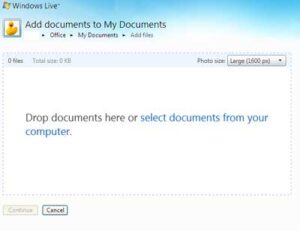
- You can store up to 25 GB of photos and files. You can make files and folders private or you can share with your network of friends.
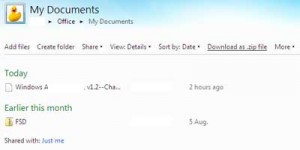
- You can arrange folders and keep your files inside just like windows explorer.Set permissions for each top-level folder that you create.
- Displaying images is another good feature. JPG, JPEG, GIF, BMP, PNG, TIF, and TIFF file types display with thumbnail images or in an online slide show
- Download an entire folder on SkyDrive as a local zip file. This is a great feature. You dont have to download multiple files one by one.
- SkyDrive is a part of Windows Live network of online services. So the reliability will not be an issue.
- Skydrive is really a cool service and if you use IE7 or higher you can drag and drop the files to upload files. Don’t have to browse through folders.
- For each folders and files SkyDrive gives one web address something similar given below.
https://cid-xxxxxxxxx.office.live.com/xxxxx.aspx/.Documents/xxxxxll.pdf
You can share links directly to your folders, files, and photos, or embed your photos and files in your blog or web page.To make this available to your friends you should make it public by sharing.


Before you go, subscribe to get latest technology articles right in your mailbox!.