WordPress Facebook like button or the Facebook share button on your WordPress blog will definitely improve your website or blog’s popularity. Facebook is the leading Social Network service with millions of people are active members. Thousands are joining every day. If you are a blog or website owner, then you can make use of the Facebook to make your blog more popular.
Facebook “Like” button is one of the best shortcut to make your blog post or article popular. If one person likes one post it will be displayed in his profile page. If that person has many friends in his network, most of them will see the Post and this may yield more traffic to your blog from Facebook.
It is always a better idea to provide a mechanism to your users to share your post. Be it Facebook Like or Twitter Tweet or Digg or any other. The more people share your article the more popular your blog becomes. Even search engine gives extra considerations to posts or articles which are popular in social network sites.
Today we will see how to add Facebook “Like” button to your wordpress post or any other pages without using any plugins. In fact the less the number of plugins you use the more faster it becomes.
Add Facebook “like” Button scripts to your blog post .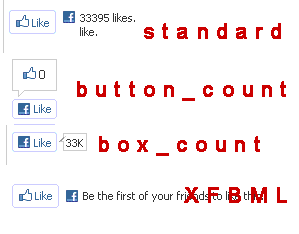
In wordpress the file which will be rendered as the post page is the ‘single.php” file. This you can see in the themes folder. Once you identified the file, you can add the code given below to the location where you want the Facebook “Like” button to appear. Find the code similar to the below code. If you want to add the facebook “Like” button below the title you can add similar to the below code.
...................................................................................

YOUR FACEBOOK LIKE SCRIPT CODE HERE
If you want to add the “Like” button below the post content you can find code similar to the below and add the script.
...................................................................................

YOUR FACEBOOK LIKE SCRIPT CODE HERE
Identify the appropriate location inside the loop, like after post header or at the end of the content etc.
There are two Facebook Like button implementations: XFBML and Iframe. The XFBML version is more feature rich but require the JavaScript SDK.
You can choose from three different layout styles.
- standard
- button_count
- box_count
- The XFBML verson
Here the XFBML version URL defaults to the current page.
Apart from the above layout styles you can also select the width of the like button, color scheme etc. You can read more detailed tutorial in Facebook Like Button reference page.



Thanks for the article. I'm trying to get it to show the word "Recommend" rather than "like" and it won't do it for me. Here's my code:
<fb:like href="" show_faces="false" width="550" send="false" action="recommend">
@Mark
You are correct the parameter "action="recommend" " will add the text "recommend" instead of like.
I forgot to wrap the code. Here is it:
<code>
<fb:like href="" show_faces="false" width="550" send="false" action="recommend">
</code>
Also, when I create it on the Facebook Developer page it inserts the App ID. Is this not necessary?
Thank you very much, I'm going to uninstall another plugin 🙂
Hi Julo,
Glad to know that this info helped you to remove another plugin!
I have been searching for information on how to add the buttons without a plugin. However my problem is my theme does not appear to have any of the files the tutorial says to use.
I'm using the Mocha Child Theme for Genesis Framework and the ONLY php file is the functions.php file. In fact besides that and the CSS file I don't have any others.
Do you have any suggestions as to where I can go. I'm really trying to limit my plugins.
Hi Colleen,
The other php files should be there with the parent Genesis Framework. Child theme is just a customization of parent theme and doest need any other files than functions.php and style css files..
Thanks for visiting globinch and for your comments 🙂
hello,I do not know create child theme .can I add this code in widget area?
Thanks so much! When I add the XFBML code to my site, it says “Invalid link” when someone tries to like.
I used this code:
<fb:like href="” show_faces=”true” width=”450″>