
The launch of Google Plus created a lot of ripples across internet social media space. The new social media experience from the search engine giant definitely will have an impact on the social media space. But how many people are going to abandon Facebook to join Google Plus is a million dollar question. Any way we can do experiments using the new Social Media Service and find out which one suites your interests better. It is always the user who is going to win because of the war among internet giants.
To get a better and added features there are a number of Google Plus extensions are available for Google Chrome. These extensions will not only make Google Plus more interesting and also adds some usability improvements to Google Plus. Let us see the top 15 Google Chrome extensions for Google Plus.
Most useful Google Plus extensions for Google Chrome
Surplus
Surplus is a useful Google Chrome extension. This tool offer Google Plus Integration for Chrome. using this you can post or respond to posts from within the popup and allows to switch between multiple Google accounts. It also gives desktop Notifications and sound notifications.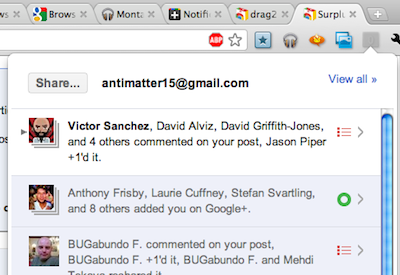
Read More and Add Surplus to Google Chrome
+Photo Zoom
+Photo Zoom is a cool extension for Google Chrome that add extra functionality to Google Plus. +Photo Zoom is a cool extension providing fast and simple zooming for photos within your Google+ Stream. You just need to hover over the image to zoom and +Photo Zoom will load the enlarged version of the picture. The extension access to the pages on plus.google.com to integrate the JavaScript necessary for zooming photos when you hover them.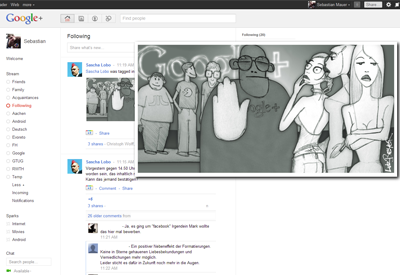
Read More and Add +Photo Zoom to Chrome
+Comment Toggle
+Comment Toggle is a nice Google Plus extension for Google Chrome browser. As the name suggests the +Comment Toggle hides any comments to posts within your Stream and makes them available if and when you actually want to see them.
According to the author the extension operates entirely within the bounds of your browser and does not collect any information. All it does is modifying the page’s source code to hide any comments.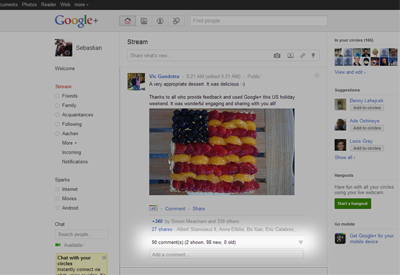
Read More and Add +Comment Toggle to chrome.
Notification Count for Google Plus™
This is an interesting extension for Google Plus. It allows you to know who are talking to you or mentioning you in their conversation on Google Plus, without having a web page opened for Google Plus or Gmail. This extension checks for any unread notifications of your Google Plus every minute, and displays unread notification count on your browser extension toolbar.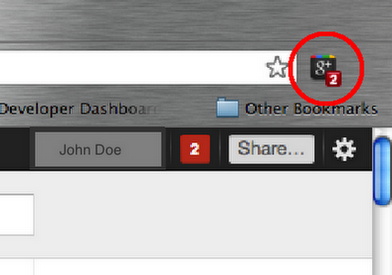
Read More and Add Notification Count for Google Plus™ to Chrome
Helper for Google+
Helper for Google+ adds extra functions to Google plus. This extension offers desktop notifications on new posts. It allows you to share Posts via twitter and also translate posts with Google Translate. You can search in Google+ posts and profiles directly from your address box. This extension can access your data on plus.google.com and your browsing history.
Know More and Add Helper For Google+ to Google Chrome
Start G+
Start G+ is another Chrome extension that adds extra features to Google Plus. The extension put Facebook and Twitter streams inside your Google Plus stream, complete with “Stream” links on the side and rich media. Whenever you share something on Google Plus the extension automatically post to Facebook and Twitter. It adds a Gmail inbox notifier to the top bar that helps you to get notified when new mail arrives without opening the Gmail Inbox. The developer also allows to sync your photos from Facebook if you visit its site.
Know More and Add Start G+ to Chrome
Share+ Social Buttons for Google Plus (Beta)
Share+ Social Buttons for Google Plus Chrome extension will add a context-link icon below your Google Plus post in order to share your post to some well-known social platforms including Twitter, Facebook, LinkedIn, StumbleUpon , Digg etc.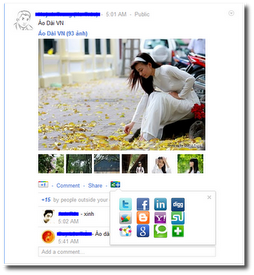
Know More and Add Share+ Social Buttons for Google Plus (Beta) to Chrome
G+ Extended
G+ Extended is another Google plus extension for Google Chrome. This extension adds some useful shortcuts for users of Google+. These shortcuts includes “+” for +1’ing a post, “-” for removing your +1 on a post, “p” to toggle your +1 on a post, “s” to share a post and “e” to expand older comments on a post.
Know More and Add G+ Extended to Chrome
Usability Boost for Google Plus™
Usability Boost for Google Plus extension will help you visualize the flow of information on Google Plus. The tool keeps Google/Notification bar stays at a fixed position on top.
Know More and Add Usability Boost for Google Plus


Before you go, subscribe to get latest technology articles right in your mailbox!.
Here is another great chrome app, G+Me, which simplifies busy streams for easy viewing. Collapsible list and expanded view, has notification count and keep tracks of new comments. Able to read stream with ease. Suitable for G+ power users. Details and download from http://huyz.us/google-plus-me/
@Leeza,
Thanks for the info. Keep visiting!
You should add the Hangout Finder Extension to that list!
https://chrome.google.com/webstore/detail/bldcana…
@hangout
Thanks for the link