
Google Plus is without doubt making ripples in Social media services industry. The entry of the search engine giant to the Social Media arena is received with much hype and expectation. Even though the Google Plus is in limited field trial now reports says that it already crossed a user base of 10 million. People can join Google Plus only if they gets invite. If you have Google Plus account you can invite your friends to join the Google Plus Social media.
Related Read:
- 9 Useful Google Chrome Google Plus Extensions
There are many different ways to invite people to join Google Plus if you have Google Plus account. Let use some different mechanisms to invite your friends to Google Plus.
1. Use the “Invite people to join Google+” Link
Easiest way click the “Invite people to join Google+” ,Enter the email addresses of the people you’d like to invite and click invite.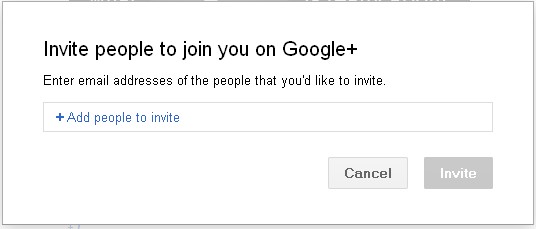
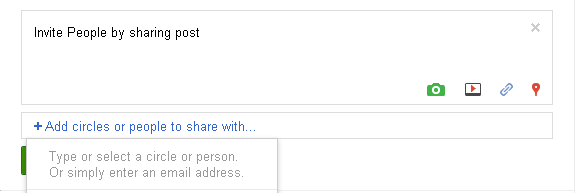
2. Invite people to join Google+ by sharing with them directly.
- Create a post.
- Click +Add circles or people to share with and add in your friend’s email address.
- Click Share.
3. Invite by sharing a post with a circle.
When you share a post with a circle, you can choose to send an invitation to anyone in that circle who hasn’t yet joined Google+.
- Create a post.
- Click +Add circles or people to share with and select the circles you want to share with.
- Select the box to email an invitation to those not on Google+ yet.
- Click Share.
4. Invite by mentioning someone in a post.
When you mention someone in a post, they’ll receive a notification that you’ve shared with them and an invitation to join Google+.
- Make a post.
- Mention someone by placing a ‘+’ or ‘@’ in front of their email address.
- Click Share.
5. Tag someone in a photo
If you tag someone in a photo who isn’t on Google+, they’ll receive a notification that they’ve been tagged and an invite to join.
- Find a photo you want to tag.
- Click Add tag and drag the box to the face you want to name.
- Enter that person’s name and email address.
- Click OK.


Before you go, subscribe to get latest technology articles right in your mailbox!.
help me in joining google plus.my id is vipin4730@gmail.com