
Google always gives more importance to security. Since millions of people are using one or more Google services like Gmail , Google Docs etc, the Google internet security or Google account login security is very important to them.
Google now introduced more security features to access your Google account. Majority of the internet services now rely on password authentication. Password authentication is not always secure. If your password is compromised you may end up in loosing all your data or more serious consequences.
Google has introduced 2-step verification process for Google Apps initially. The 2-step verification process which is an advanced opt-in security feature now available for Google Account also. This makes your Google Account significantly more secure by helping to verify that you’re the real owner of your account. This 2-step verification process is an opt-in security feature. You can configure the 2-Step verification process in the Manage Account screen as below.
2-step verification process still require you to enter your password. Password authentication is the first step of the 2-step verification process.
After password authentication you will see an extra page that prompts you for a code. This is the second step which involves an additional process. During signing in, Google will send a verification code to your phone, or let you generate one yourself using an application on your Android, BlackBerry or iPhone device. You need to enter the additional code. see below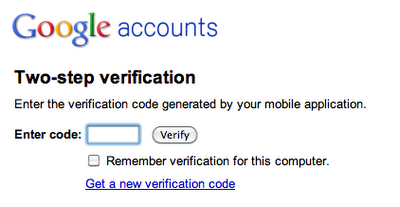
This feature ensure that even if someone has stolen your password, they’ll need more than that to access your account, since password is just one step of the 2-step verification process. Also mobile phone is always with you and the security mechanism is really excellent.


Before you go, subscribe to get latest technology articles right in your mailbox!.